
Get Free PC Consultation
Talk to our experts and get the best PC solution for your needs and budget.
Your details are safe. No spam, ever.

Talk to our experts and get the best PC solution for your needs and budget.
Your details are safe. No spam, ever.
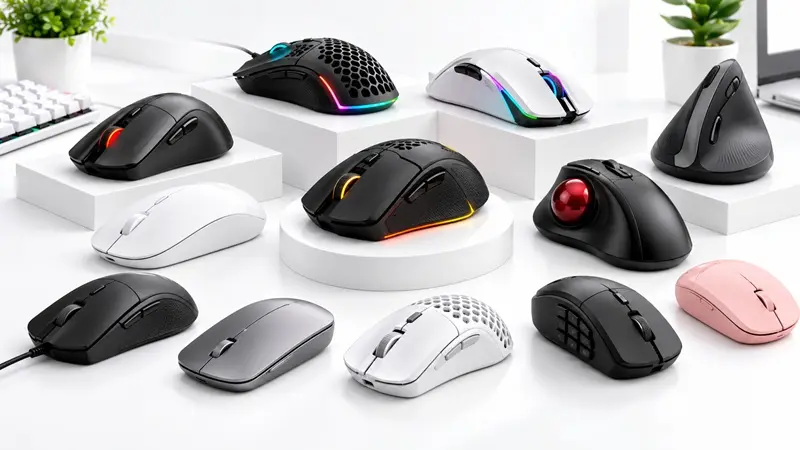
Meta Title: Types of Computer Mouse: Gaming, Wireless & More
Meta Description: Explore different types of computer mice, including gaming, wireless, ergonomic, optical, and Bluetooth mice. Learn how to choose the best mouse for your needs.
Suggested URL Slug: /blog/types-of-computer-mouse
A computer mouse is an essential peripheral for navigating your computer, playing games, editing videos, designing graphics, and completing everyday tasks. However, choosing the right mouse can make a significant difference in comfort, precision, and productivity.
From high-performance gaming mice with adjustable DPI to ergonomic mice designed for long working hours, different types of computer mice offer features for different users.
Whether you are building a gaming PC, upgrading your office setup, or looking for a reliable mouse for everyday use, understanding the available options will help you make an informed decision.
In this guide, we will explore the major types of computer mice, their features, advantages, disadvantages, and ideal use cases.
An optical mouse uses an LED light and an optical sensor to track movement across a surface. It is one of the most common types of computer mice used today.
Optical sensor technology.
Available in wired and wireless models.
Easy to use for everyday computing.
Compatible with a wide range of computers.
Best for: Office work, students, browsing, and everyday computer use.
Advantages: Affordable, reliable, and widely available.
Disadvantages: Tracking performance can vary depending on the sensor and surface.
An optical mouse is a practical choice for users who need dependable performance without advanced features.
A laser mouse uses a laser-based illumination system to track movement. Depending on the sensor design, it may work well on a wider variety of surfaces than some traditional optical mice.
Laser-based tracking technology.
Available in different sensitivity levels.
Offered in wired and wireless designs.
Suitable for general productivity and selected specialist applications.
Best for: Office professionals and users who want versatile tracking.
Advantages: Some models track effectively on surfaces where other mice struggle.
Disadvantages: Performance depends on the sensor and surface; laser technology does not automatically make a mouse more accurate than an optical mouse.
When buying a mouse, consider real-world tracking performance rather than choosing solely by sensor type.
A gaming mouse is designed for responsive tracking, precise movement, and customisable controls. It is particularly popular among PC gamers who want greater control during gameplay.
Adjustable DPI sensitivity.
Dedicated programmable buttons on selected models.
High polling rates on supported models.
Lightweight and ergonomic designs.
RGB lighting on some models.
Gaming software for button mapping and sensitivity settings.
Best for: FPS, MOBA, MMO, racing, and other PC games.
Advantages: Customisation, specialised controls, and a wide range of shapes and sensor capabilities.
Disadvantages: Premium models can be expensive, and extra buttons or lighting may not benefit every player.
Consider the following factors before purchasing a gaming mouse:
DPI: Determines how far the cursor moves relative to physical mouse movement.
Polling rate: Indicates how frequently the mouse reports its position to the computer.
Weight: Lightweight mice may suit fast movements, while heavier models may feel more stable to some users.
Shape and grip: Choose a design that suits your hand size and whether you use a palm, claw, or fingertip grip.
Buttons: Additional controls can help in games that use many shortcuts.
Connectivity: Wired and low-latency wireless options can both perform well for gaming.
The best gaming mouse is the one that fits your hand, supports your play style, and delivers consistent tracking.
A wireless mouse connects to a computer without a physical data cable. Depending on the model, it uses a USB wireless receiver or Bluetooth.
Cable-free operation.
Portable design.
Rechargeable or replaceable batteries.
Available in office and gaming versions.
Best for: Home offices, laptops, travel, and clean desktop setups.
Advantages: Reduces cable clutter and allows flexible positioning.
Disadvantages: Requires battery management, and connection quality depends on the wireless technology and environment.
For gaming, choose a model designed for low-latency performance. For office work, battery life and convenient connectivity may be more important.
A wired mouse connects directly to a computer, commonly through USB. It remains a popular option for users who want a straightforward, dependable connection.
Direct wired connection.
No mouse battery required.
Available at a wide range of prices.
Simple setup for compatible computers.
Best for: Budget users, office desktops, and gaming setups.
Advantages: No charging, straightforward connectivity, and excellent value in many price ranges.
Disadvantages: The cable can restrict movement and create desk clutter.
A wired mouse is an excellent choice if you prefer simplicity and do not mind having a cable on your desk.
A Bluetooth mouse connects to compatible devices through Bluetooth without requiring a dedicated USB receiver.
Wireless connectivity.
No dedicated receiver required on compatible devices.
Often supports laptops, tablets, and multiple-device workflows.
Available in compact and full-size designs.
Best for: Laptop users, travellers, and multi-device workstations.
Advantages: Convenient portability and fewer occupied USB ports.
Disadvantages: Requires a compatible Bluetooth connection, and reconnection or latency can vary by device and model.
If your laptop has limited USB ports, a Bluetooth mouse can be a convenient solution.
An ergonomic mouse is designed to support a comfortable hand position during computer use. Designs range from conventional contoured mice to vertical mice and trackball models.
Contoured shapes.
Vertical or angled designs on selected models.
Different sizes for different hands.
Wired and wireless options.
Best for: Office professionals, programmers, and users who spend long periods working at a computer.
Advantages: May improve comfort when the shape and size suit the user.
Disadvantages: Some designs require an adjustment period and may feel unfamiliar initially.
Ergonomic mice do not guarantee the prevention of wrist pain or repetitive strain injuries. Proper desk setup, regular breaks, and a comfortable grip remain important.
A vertical mouse positions the hand in a more handshake-like orientation rather than the flatter position associated with many conventional mice.
Upright or angled design.
Dedicated thumb and finger support on many models.
Available in wired and wireless versions.
Different sizes and angles depending on the manufacturer.
Best for: Users who prefer a more neutral forearm position while working.
Advantages: May feel more comfortable for some users during extended computer sessions.
Disadvantages: Takes time to learn and may not suit every hand size or workflow.
Before buying a vertical mouse, consider its dimensions, button placement, and whether you can try the shape comfortably.
A trackball mouse uses a stationary ball that the user rotates with their thumb or fingers to control the pointer. The device itself does not need to move across the desk.
Stationary base.
Thumb-operated or finger-operated ball.
Requires little desk movement.
Available in wired and wireless designs.
Best for: Small desks, specialised workstations, and users who prefer controlling the pointer without moving the entire device.
Advantages: Saves desk space and can reduce the need for broad arm movements.
Disadvantages: Requires practice, and the ball may need periodic cleaning.
A trackball can be useful where desk space is limited or conventional mouse movement is inconvenient.
Travel mice are compact devices designed for portability. They are commonly paired with laptops and portable workstations.
Compact dimensions.
Lightweight construction.
Wired, Bluetooth, or USB-receiver connectivity.
Easy storage in a laptop bag.
Best for: Students, travellers, and people who work from different locations.
Advantages: Portable and convenient for mobile computing.
Disadvantages: Smaller dimensions may be less comfortable for prolonged use, particularly for users with larger hands.
For everyday travel, prioritise comfortable controls, battery life, and compatibility with your devices.
An MMO mouse is designed with additional programmable buttons that can be assigned to shortcuts, macros, or in-game commands.
Multiple side buttons.
Programmable controls.
Custom profiles on supported models.
Software for assigning commands and macros.
Best for: MMO gaming, productivity shortcuts, and workflows that involve many repeated commands.
Advantages: Reduces reliance on keyboard shortcuts and can improve access to frequently used commands.
Disadvantages: More buttons can increase weight and require time to configure.
A multi-button mouse is particularly useful when you regularly perform complex actions or play games that require numerous abilities.
A silent mouse uses switches designed to reduce the clicking sound produced by its primary buttons.
Reduced click noise.
Wired and wireless options.
Available in compact and standard sizes.
Designed for quieter work environments.
Best for: Libraries, shared offices, meetings, and late-night computer use.
Advantages: Minimises clicking noise and helps maintain a quieter workspace.
Disadvantages: Button feel varies by model, and silent switches may feel different from conventional mouse switches.
If noise matters in your environment, check that both left and right buttons are designed for quiet operation.
Both optical and laser mice use optical sensing principles, but they differ in their illumination technology and implementation.
| Feature | Optical Mouse | Laser Mouse |
|---|---|---|
| Illumination | Usually LED | Laser-based |
| Tracking | Depends on sensor and surface | Depends on sensor and surface |
| Surface compatibility | Varies by model | Some models support a broader range |
| Typical uses | Office, gaming, everyday computing | Office and specialised applications |
| Performance | Can be highly accurate | Can also be highly accurate |
For most users, sensor quality, tracking consistency, shape, and usability are more important than whether the mouse is labelled optical or laser.
Choosing between wired and wireless depends on your priorities.
| Feature | Wired Mouse | Wireless Mouse |
|---|---|---|
| Connection | Physical cable | Bluetooth or wireless receiver |
| Battery | Not normally required | Required |
| Desk setup | Cable management needed | Cleaner appearance |
| Portability | Cable can be inconvenient | Usually convenient |
| Gaming | Excellent options available | Excellent low-latency options available |
| Price | Often affordable | Wide price range |
Neither connection type is universally superior. Modern wireless gaming mice can deliver excellent performance, while wired models remain reliable and cost-effective.
Before purchasing a mouse, evaluate these essential factors:
Purpose: Determine whether you need it for gaming, work, design, or everyday computing.
DPI and sensor: Look for consistent tracking and a sensitivity range that suits your needs.
Shape and size: Ensure the mouse fits your hand and preferred grip.
Weight: Choose a weight that feels comfortable and controllable.
Connectivity: Decide between USB, Bluetooth, and dedicated wireless connectivity.
Buttons: Consider whether programmable buttons will improve your workflow.
Battery life: For wireless models, compare expected battery life and charging convenience.
Compatibility: Check operating system and device support.
Budget: Prioritise useful features and build quality over specifications you may never use.
The ideal mouse depends on your primary activity.
For competitive gaming: Choose a comfortable gaming mouse with reliable tracking and low-latency connectivity.
For office work: A comfortable wireless or wired mouse with dependable controls is often sufficient.
For graphic design: Consider accurate tracking, comfortable controls, and programmable buttons for common actions.
For programming: Prioritise comfort, reliable scrolling, and shortcuts that suit your workflow.
For travel: A compact Bluetooth or wireless mouse is easy to carry.
For quiet environments: Consider a silent mouse with reduced-click-noise switches.
For specialised workflows: A trackball or multi-button mouse may provide useful control options.
There is no single mouse that suits every user. The right choice depends on your comfort, requirements, and budget.
Common types include optical, laser, gaming, wireless, wired, Bluetooth, ergonomic, vertical, trackball, travel, multi-button, and silent mice. These categories overlap, so a single mouse may belong to several types.
A gaming mouse with reliable tracking, a comfortable shape, and low-latency connectivity is a strong choice. Consider weight, sensor performance, programmable buttons, and your preferred grip.
DPI describes how many counts the mouse reports per inch of physical movement and influences cursor sensitivity. Polling rate describes how frequently the mouse reports its state to the computer, usually expressed in hertz (Hz).
Wireless mice provide greater placement flexibility, while wired mice do not require battery charging. Both can perform well, including in gaming, depending on the model and connection technology.
An ergonomic mouse is shaped to support a comfortable hand position. Vertical mice and trackballs are examples of designs that may suit particular users.
There is no universal best DPI. Many gamers use moderate sensitivity settings, but the ideal value depends on game type, screen resolution, mouse movement, and personal preference.
A comfortable wired or wireless mouse with dependable tracking and convenient scrolling is suitable for most office tasks. Users who spend long periods at a computer may also consider ergonomic designs.
Choosing the right computer mouse can improve your gaming experience, everyday productivity, and comfort. Gaming mice focus on responsive tracking and customisation, wireless mice provide flexibility, ergonomic mice offer alternative hand positions, and trackballs can be useful when desk space is limited.
Before buying, compare sensor performance, shape, weight, connectivity, features, and price to find a mouse that matches your requirements.
Explore computer mice and gaming peripherals at Computer IT Mart to find the right addition to your PC setup.
Choose your mouse. Improve your control. Build your ideal setup.
