
Get Free PC Consultation
Talk to our experts and get the best PC solution for your needs and budget.
Your details are safe. No spam, ever.

Talk to our experts and get the best PC solution for your needs and budget.
Your details are safe. No spam, ever.
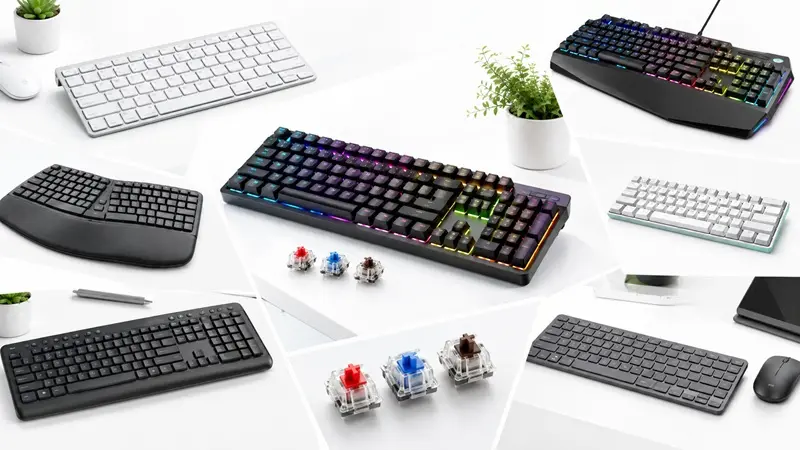
Meta Title: Types of Keyboards: Gaming, Mechanical, Wireless & More
Meta Description: Explore different types of keyboards, including mechanical, membrane, gaming, wireless, ergonomic, and more. Find the best keyboard for gaming, work, and everyday use.
Suggested URL Slug: /blog/types-of-keyboards
A keyboard is one of the most essential computer peripherals, whether you use your PC for gaming, office work, programming, content creation, or everyday browsing. However, not all keyboards offer the same typing experience, performance, or features.
From mechanical keyboards with satisfying tactile feedback to wireless keyboards that keep your desk clutter-free, there are several options available for different needs and budgets.
Understanding the different types of keyboards can help you choose a model that improves comfort, productivity, and gaming performance. In this guide, we will explore the most popular keyboard types, their features, advantages, disadvantages, and ideal use cases.
Mechanical keyboards use individual mechanical switches beneath each key. These switches provide distinct feedback and are available in different configurations, making mechanical keyboards popular among gamers, programmers, and enthusiasts.
Individual switches for each key.
Available with linear, tactile, and clicky switch types.
Often offer excellent durability.
Frequently support key customization and RGB lighting.
Available in multiple sizes, including full-size, TKL, and 60% layouts.
Best for: Gaming, programming, heavy typing, and keyboard enthusiasts.
Advantages: Responsive typing, customizable switches, and a wide range of layouts.
Disadvantages: Can be expensive, and some models produce noticeable typing noise.
Membrane keyboards use a pressure-sensitive membrane layer to register key presses. They are commonly found in office setups, schools, and budget desktop computer packages.
Generally affordable.
Lightweight and easy to use.
Usually quieter than clicky mechanical keyboards.
Available in wired and wireless versions.
Best for: Everyday computing, office work, students, and budget-conscious users.
Advantages: Low cost, simple design, and generally quiet operation.
Disadvantages: Often provide less distinct tactile feedback and fewer customization options than mechanical keyboards.
Gaming keyboards are designed to support fast inputs, comfortable gameplay, and additional customization. They may use mechanical, membrane, or other switch technologies.
RGB or single-colour backlighting.
Anti-ghosting and N-key rollover on supported models.
Programmable keys and macros on selected keyboards.
Gaming software for lighting and key customization.
Dedicated media controls on some models.
Best for: Competitive gaming, casual gaming, and gaming PC setups.
Advantages: Gaming-focused features, customization, and improved visibility in low-light environments.
Disadvantages: Some models are expensive and include features that casual users may not need.
When choosing a gaming keyboard, consider switch type, layout, latency, build quality, and compatibility with your favourite games.
Wireless keyboards connect to computers without a physical data cable. Depending on the model, they use Bluetooth or a dedicated USB wireless receiver.
Cable-free desk setup.
Easy to move between compatible devices.
Available in compact and full-size layouts.
May support multiple device connections.
Best for: Home offices, minimalist desks, laptops, and multi-device users.
Advantages: Better desk flexibility and reduced cable clutter.
Disadvantages: Requires battery charging or replacement, and wireless performance depends on the connection and device.
For gaming, check whether the keyboard offers a low-latency wireless connection rather than choosing based on wireless convenience alone.
Wired keyboards connect directly to a computer, usually through USB. They are widely used for gaming, professional work, and everyday computing.
Direct connection to the computer.
No keyboard battery required.
Available in a broad range of prices.
Compatible with many desktop PCs and laptops.
Best for: Gaming, office computers, and users who prefer a simple connection.
Advantages: Reliable connectivity, no battery management, and often excellent value.
Disadvantages: The cable can add clutter and limit placement flexibility.
Ergonomic keyboards are designed to encourage a more comfortable hand and wrist position during typing. Some have split layouts, curved key arrangements, or integrated wrist rests.
Ergonomically shaped layouts on selected models.
Split or angled designs.
Optional wrist rests.
Available in wired and wireless versions.
Best for: People who type for extended periods and users looking for a more comfortable desk setup.
Advantages: May improve typing comfort when properly fitted to the user.
Disadvantages: Can be expensive and may require an adjustment period.
An ergonomic keyboard does not automatically prevent discomfort or injury. Proper desk height, neutral wrist positioning, regular breaks, and an appropriate keyboard layout also matter.
Compact keyboards reduce desk space by removing the number pad or other keys. They are particularly popular among gamers and users who prefer a minimalist setup.
Full-size: Includes the function row, navigation keys, and number pad.
TKL (Tenkeyless): Removes the number pad while retaining most other keys.
75%: Keeps many function and navigation keys in a tighter layout.
65%: Typically removes the function row while retaining arrow keys and some navigation keys.
60%: Usually removes the function row, dedicated arrow keys, and number pad.
Best for: Gaming setups, smaller desks, and users who prioritise portability.
Advantages: Saves space and can provide more room for mouse movement.
Disadvantages: Smaller layouts may require key combinations to access certain functions.
Choose a layout based on the keys you use most frequently rather than size alone.
Multimedia keyboards include dedicated controls for functions such as volume adjustment, playback, and media navigation.
Volume and mute controls.
Play, pause, and track navigation on supported models.
Shortcut keys for frequently used functions.
Available in wired and wireless designs.
Best for: Office workers, students, home entertainment systems, and everyday computer users.
Advantages: Convenient access to common controls.
Disadvantages: Additional keys may be unnecessary for users who rarely use media shortcuts.
Mechanical keyboards can feel very different depending on the switches installed. Understanding these differences can help you select a keyboard suited to your preferences.
Linear switches move smoothly from top to bottom without a pronounced tactile bump.
Ideal for: Users who prefer smooth key presses and many gaming applications.
Tactile switches provide a noticeable bump during a key press, giving feedback that the key has actuated.
Ideal for: Typing, programming, and users who prefer physical feedback.
Clicky switches provide tactile feedback along with a distinct clicking sound.
Ideal for: Users who enjoy audible typing feedback and do not need a quiet workspace.
Important: Switch preferences are personal. A linear switch is not automatically faster for every gamer, and a tactile switch is not necessarily better for every typist.
The right choice depends on your budget, preferred typing feel, and intended use.
| Feature | Mechanical Keyboard | Membrane Keyboard |
|---|---|---|
| Key mechanism | Individual mechanical switches | Membrane pressure mechanism |
| Typing feel | Varies by switch | Usually softer |
| Price | Wide range, often higher | Generally budget-friendly |
| Customization | Often extensive | Usually limited |
| Noise | Depends on switches and design | Often quieter |
| Durability | Depends on switch and build quality | Depends on construction |
| Best suited for | Gaming, typing, enthusiasts | Everyday use, office work, budgets |
Both types can work well for everyday computing. Your priorities should determine which one you choose.
Before buying a keyboard, consider the following factors:
Purpose: Decide whether you need it for gaming, office work, programming, or general use.
Switch type: If choosing mechanical, compare linear, tactile, and clicky switches.
Layout: Select full-size, TKL, 75%, 65%, or 60% based on your workflow.
Connectivity: Choose wired, Bluetooth, or dedicated wireless connectivity.
Build quality: Consider the keycaps, frame, stabilisers, and overall construction.
Compatibility: Check support for your operating system and devices.
Budget: Compare useful features instead of paying extra for specifications you will not use.
Comfort: Consider key spacing, typing angle, wrist support, and your desk arrangement.
The best keyboard depends on how you use your computer.
For competitive gaming: Consider a keyboard with responsive switches, reliable performance, and suitable rollover support.
For office work: A comfortable, quiet keyboard with convenient shortcuts may be ideal.
For programming: Choose a layout and switch type that suit long typing sessions.
For a compact gaming setup: A 65% or TKL keyboard can free up mouse space.
For everyday computing on a budget: A reliable membrane keyboard may offer everything you need.
For a wireless workstation: Look for stable connectivity, good battery life, and multi-device support if required.
There is no single best keyboard for everyone. Your ideal choice depends on comfort, features, available space, and budget.
The main categories include mechanical, membrane, gaming, wireless, wired, ergonomic, compact, and multimedia keyboards. These categories can overlap; for example, a gaming keyboard can also be mechanical and wireless.
A mechanical gaming keyboard with reliable switches, suitable rollover support, and low input latency is a popular choice. The best model depends on the games you play, your preferred layout, and your budget.
Mechanical keyboards generally offer more switch choices and customization, while membrane keyboards are usually more affordable. Neither is universally better; both can be suitable for different users.
Wired keyboards connect through a cable, while wireless keyboards use Bluetooth or a wireless receiver. Wired models eliminate battery concerns, whereas wireless models offer greater placement flexibility.
TKL stands for Tenkeyless. It describes a keyboard that typically removes the dedicated number pad while retaining the function row, arrow keys, and most navigation keys.
A comfortable keyboard with suitable key spacing and a preferred switch feel is a good starting point. Mechanical tactile switches are popular among typists, but quiet membrane keyboards and other designs can also work well.
Understanding the different types of keyboards makes it easier to select the right peripheral for your setup. Mechanical keyboards offer a wide range of switch experiences, membrane keyboards provide an affordable option, wireless keyboards reduce cable clutter, and ergonomic designs focus on typing comfort.
Before making a purchase, consider your primary use, preferred layout, connectivity requirements, and budget.
Explore keyboard options at The IT Gear to find peripherals that complement your gaming PC, workstation, or everyday computer setup.
Find your ideal keyboard and build a setup that works for you.
