
Get Free PC Consultation
Talk to our experts and get the best PC solution for your needs and budget.
Your details are safe. No spam, ever.

Talk to our experts and get the best PC solution for your needs and budget.
Your details are safe. No spam, ever.
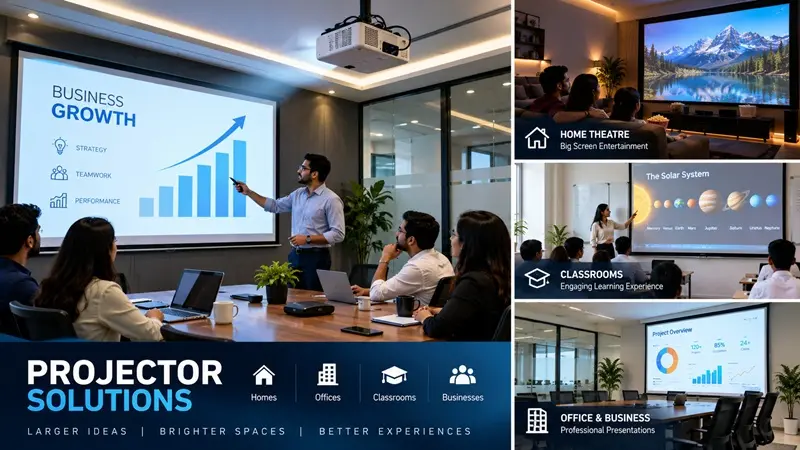
Meta Title: Projector Solutions for Home, Office & Classroom | Computer IT Mart
Meta Description: Explore projector solutions for home theatres, office presentations, classrooms, and conference rooms. Learn about brightness, resolution, screen size, and setup with Computer IT Mart.
Suggested URL Slug: projector-solutions-for-home-office-classroom
Whether you want to enjoy movies on a large screen, deliver professional presentations, teach students more effectively, or conduct engaging corporate training sessions, the right projector can transform how you use a space.
Projectors offer a flexible alternative to conventional displays by producing large images that are suitable for viewing by multiple people at once. With the right combination of brightness, resolution, projection distance, and screen size, you can create an effective viewing experience for almost any environment.
However, choosing a projector is not simply about selecting the model with the highest resolution or the lowest price. Room lighting, audience size, installation position, connectivity, and intended usage all influence the final result.
At Computer IT Mart, we offer projector solutions for homes, offices, educational institutions, conference rooms, and businesses, helping customers choose equipment that fits their requirements.
Watching movies on a large screen can create a more immersive entertainment experience than using a conventional television. A projector allows homeowners to create a dedicated home theatre or a flexible entertainment space.
Whether you enjoy movies, sports, streaming content, or gaming, a suitable projector can help turn a living room or media room into a personal cinema.
Resolution: Full HD may be sufficient for many setups, while 4K projectors can provide greater detail on large screens.
Brightness: A darker room generally allows a projector to deliver a more satisfying image. Rooms with ambient light may require higher brightness.
Screen size: Choose a screen that suits the room dimensions and viewing distance.
Audio: Consider external speakers or a compatible home theatre sound system for a more immersive experience.
Connectivity: Check support for your streaming device, laptop, gaming console, or other video sources.
Pro tip: Before purchasing a projector, measure the available wall or screen area and check the manufacturer’s throw-distance specifications to confirm that the projector can produce your desired image size.
Business presentations often involve financial reports, sales figures, product demonstrations, training materials, and strategic plans. A projector enables teams to share information on a large screen, making it easier for groups to follow the same content.
Projectors can be particularly useful in meeting rooms where several people need to view spreadsheets, presentation slides, diagrams, or other business documents.
Adequate brightness: Helps maintain visibility when some room lights remain on.
Readable resolution: Important for charts, spreadsheets, text, and detailed slides.
Flexible connectivity: HDMI, USB, wireless projection, or network features, depending on the projector and connected devices.
Easy setup: Useful for teams that regularly move between meeting rooms.
Reliable operation: Consider manufacturer support, warranty coverage, and maintenance requirements.
For smaller meeting rooms, a compact projector may be sufficient. Larger conference spaces may require greater brightness and more careful placement to ensure that everyone can see the presentation clearly.
Visual learning plays an important role in modern education. Projectors allow teachers to display presentations, educational videos, diagrams, digital textbooks, and other learning resources to an entire classroom.
They can also support collaborative activities by allowing students to discuss diagrams, solve problems together, and review shared material.
Brightness: Consider the amount of daylight entering the room and whether lights need to remain on during lessons.
Resolution: Select a resolution that keeps text, diagrams, and educational videos sufficiently clear for the intended screen size.
Screen visibility: Ensure that students seated at the back can see the content comfortably.
Connectivity: Check compatibility with the computers, laptops, document cameras, or other teaching devices used by the institution.
Maintenance: Consider lamp life, filter cleaning, warranty coverage, and the availability of replacement parts where applicable.
For schools, colleges, coaching centres, and training institutes, the right projector can help make lessons more engaging while supporting different teaching methods.
Conference rooms and corporate training spaces often need to accommodate different types of content, from presentations and spreadsheets to video demonstrations and collaborative workshops.
The projector should be selected according to room size, seating arrangement, ambient lighting, and the number of participants.
For larger rooms, brightness and screen dimensions become particularly important. The projector must produce an image that remains clear and readable from the farthest seats.
Determine the typical number of participants.
Measure the distance between the projector and the screen.
Evaluate the room’s lighting conditions.
Check compatibility with presentation systems and conferencing equipment.
Consider ceiling mounting, cable routing, and access for maintenance.
A well-planned setup can reduce connection problems, improve presentation visibility, and make meetings easier to manage.
Different environments require different projector specifications. Understanding the main technical factors can help you avoid unnecessary spending.
Brightness is generally measured in ANSI lumens or another clearly specified light-output standard. Higher brightness can help in rooms with more ambient light, but the ideal level also depends on screen size, projection technology, and viewing conditions.
A dark home theatre and a brightly lit classroom may require very different brightness levels.
Resolution affects the amount of detail visible in the projected image.
HD: Suitable for some basic viewing and presentation requirements.
Full HD (1080p): A practical option for many home entertainment and business applications.
4K: Offers greater detail for compatible content, particularly on larger screens.
The best resolution depends on the content you display, your viewing distance, and your budget.
Throw distance determines how far the projector must be from the screen to create a particular image size.
Standard-throw projectors need more distance than short-throw models for the same screen dimensions. Ultra-short-throw projectors can sit very close to the projection surface.
Always check the manufacturer’s throw-ratio calculator or specifications before finalising your installation.
A larger image is not automatically better. The screen should be proportionate to the room and allow viewers to see content comfortably.
Common widescreen content uses a 16:9 aspect ratio, while some business and educational content may use other formats. Select a screen that suits your primary use and check how the projector handles different aspect ratios.
Before buying, confirm that the projector supports the devices you intend to connect.
Depending on the model, useful options may include HDMI, USB, wireless casting, audio output, and network connectivity. Wireless projection may require a compatible application, adapter, or network environment.
Neither option is ideal for every situation.
| Requirement | Projector | Television |
|---|---|---|
| Large-screen viewing | Can create very large images | Limited by the display’s physical size |
| Bright-room performance | Depends on projector brightness and ambient light | Generally strong in everyday bright rooms |
| Installation | May require mounting and screen positioning | Often simpler to install |
| Home theatre | Suitable for a dedicated cinema-style setup | Suitable for everyday entertainment |
| Office presentations | Useful for displaying content to groups | Useful for smaller meeting spaces |
| Portability | Some models are easy to move | Most models are designed for fixed placement |
If you primarily want a very large cinematic image in a controlled-light environment, a projector may be a strong choice. If you need a display for frequent daytime viewing without controlling room lighting, a television may be more practical.
Even a capable projector can deliver disappointing results if it is installed incorrectly.
Screen dimensions, mounting height, throw distance, cable routing, keystone correction, focus, and ambient light all affect the final image.
Computer IT Mart assists customers with projector selection, screen-size guidance, and setup planning so that the chosen equipment is appropriate for the intended space.
A typical planning process includes:
Understanding the application: Home entertainment, business presentations, classroom teaching, or training.
Assessing the room: Dimensions, lighting, seating layout, and mounting options.
Selecting the projector: Matching brightness, resolution, throw distance, and connectivity to the use case.
Planning the screen: Choosing an appropriate size and aspect ratio.
Checking installation requirements: Power, signal cables, mounting hardware, audio, and device compatibility.
Testing the setup: Verifying image focus, alignment, readability, and source connections.
For permanent installations, planning these details in advance can help prevent costly adjustments later.
Every projection environment has different requirements. A home theatre needs a different balance of image quality and lighting performance than a classroom or corporate meeting room.
Computer IT Mart helps customers evaluate their requirements before choosing a projector solution.
Our support focuses on:
Projector selection for different applications.
Brightness and resolution considerations.
Screen-size and projection-distance guidance.
Connectivity and source-device compatibility.
Setup planning for homes, offices, classrooms, and conference rooms.
Whether you are equipping a single meeting room or planning a projection setup for an educational institution, choosing the right configuration from the beginning can help you achieve better results.
The best projector depends on room lighting, screen size, viewing distance, and the content you watch. For a dedicated home theatre, resolution and image quality may be priorities. For a living room with ambient light, brightness becomes especially important.
The required brightness depends on classroom size, ambient lighting, screen dimensions, and viewing distance. Compare models using their stated light-output specifications and evaluate the installation environment before choosing.
There is no single ideal size. Screen dimensions should be based on room size, audience distance, projected resolution, and the type of content being displayed.
Yes. Projectors are widely used for presentations, training sessions, meetings, and group discussions. Check that the brightness, resolution, and connectivity suit the room and presentation equipment.
A suitable, flat, neutral-coloured wall can work for some installations. However, a dedicated projector screen can provide a more consistent viewing surface and may improve the overall experience.
Computer IT Mart offers guidance on projector selection, screen sizing, and setup planning for homes, offices, classrooms, and businesses. Contact the team to discuss your room dimensions, intended use, and equipment requirements.
The right projector can transform a living room into a home theatre, make business presentations more effective, support classroom learning, and improve collaboration in conference rooms.
The key is to look beyond resolution alone. Brightness, screen size, throw distance, connectivity, ambient lighting, and installation requirements all play a role in achieving a clear, comfortable viewing experience.
Looking for projector solutions for your home, office, classroom, or business?
Connect with Computer IT Mart for guidance on projector selection, screen-size planning, and setup requirements. Find a solution that fits your space, your budget, and the way you work or enjoy entertainment.
Computer IT Mart — Practical Technology Solutions for Every Space.
