
Get Free PC Consultation
Talk to our experts and get the best PC solution for your needs and budget.
Your details are safe. No spam, ever.

Talk to our experts and get the best PC solution for your needs and budget.
Your details are safe. No spam, ever.
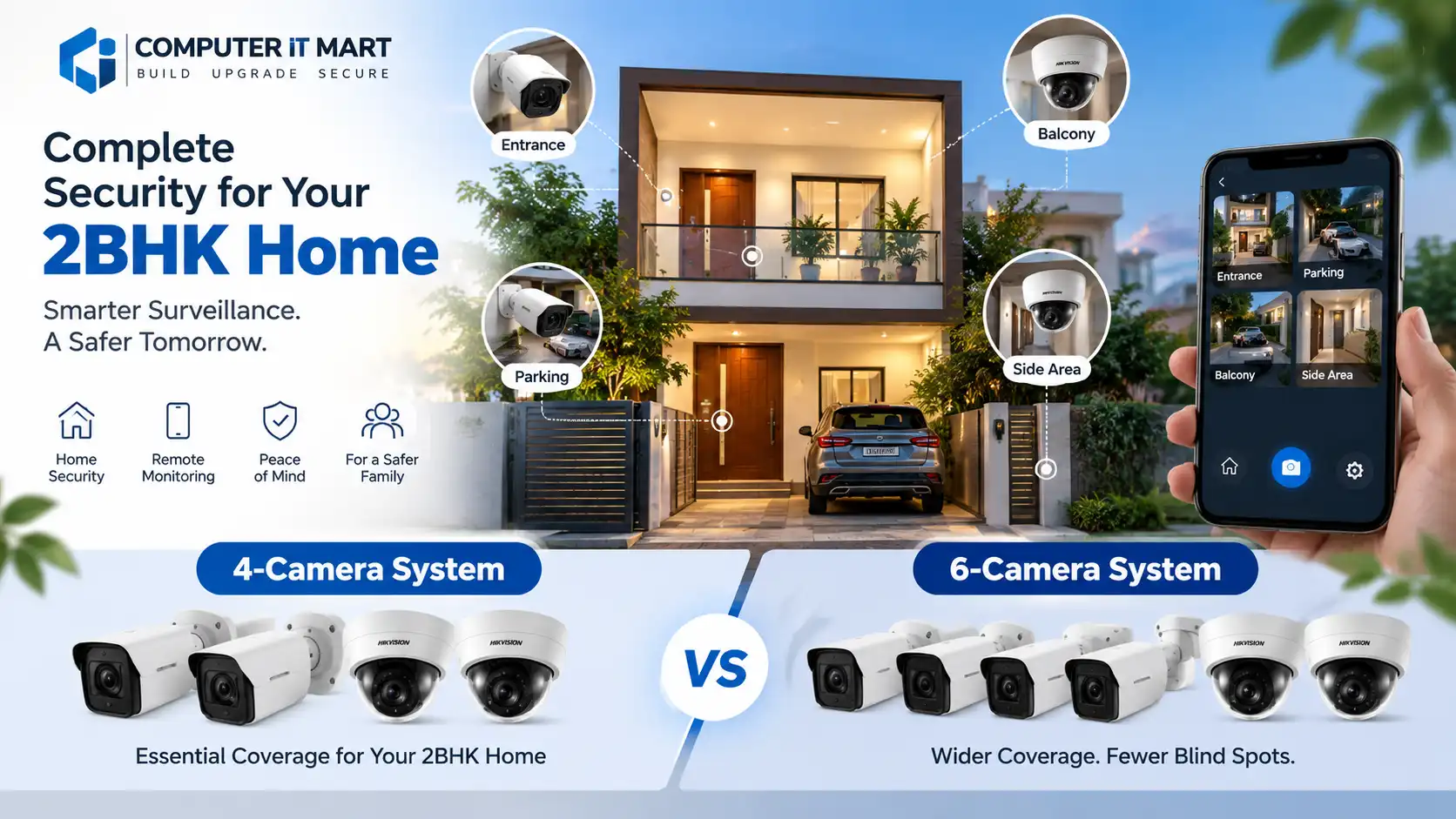
When it comes to home security, CCTV cameras have become an essential investment for many homeowners. A well-planned CCTV system can help you monitor your entrance, parking area, balcony, common areas, and other important locations around your home.
For a typical 2BHK home, one of the most common questions is:
Should you install a 4-camera CCTV system or a 6-camera CCTV system?
The answer depends on the layout of your home, the number of entry points, parking area, floor plan, and how much coverage you need.
In this guide, we compare 4-camera vs 6-camera CCTV systems for a 2BHK home, including camera placement, storage requirements, installation considerations, and which option provides better value.
A 4-camera system can provide sufficient coverage for a compact 2BHK home with limited entry points. However, a 6-camera system provides additional coverage and reduces blind spots.
| Feature | 4-Camera CCTV | 6-Camera CCTV |
|---|---|---|
| Coverage | Basic | Wider |
| Suitable for | Compact 2BHK | Larger 2BHK |
| Entry monitoring | Excellent | Excellent |
| Parking coverage | Good | Excellent |
| Blind-spot reduction | Moderate | Better |
| Storage requirement | Lower | Higher |
| Installation cost | Lower | Higher |
| Future flexibility | Moderate | Better |
| Recommended for | Basic security | Comprehensive security |
If your priority is basic security at a lower cost, 4 cameras may be enough.
If you want better coverage around the entire property, a 6-camera setup is usually the better choice.
Before deciding between four or six cameras, it is important to identify the critical areas around your home.
A typical 2BHK home may have:
Main entrance
Back entrance or service entrance
Parking area
Living room entrance/common area
Balcony
Staircase
Side passage
Garden or outdoor area
You don’t necessarily need a camera in every room. Instead, focus on entry points and areas where security incidents are most likely to occur.
For a compact home, a 4-camera configuration can provide good coverage when cameras are positioned strategically.
The main entrance should be your first priority.
Position the camera so that it can capture:
People entering and leaving
Visitors
Delivery personnel
The area immediately outside the door
Avoid positioning the camera directly toward strong sunlight, as this can reduce image quality.
A camera covering the parking area can help monitor:
Cars and motorcycles
People approaching vehicles
Vehicle movement
Suspicious activity
For better coverage, choose a camera with a suitable viewing angle rather than simply mounting it at the highest possible position.
If your home has a rear entrance, service entrance or side passage, this is another important location.
A camera here can reduce a major blind spot that may otherwise be overlooked.
The fourth camera should be selected based on your home’s layout.
For example:
Independent house: Balcony, staircase or rear garden.
Apartment: Main corridor/entrance or another critical access point, subject to society rules and privacy considerations.
Camera 1 → Main entrance
Camera 2 → Parking
Camera 3 → Rear/side entrance
Camera 4 → Staircase/balcony/common access area
This configuration provides a good balance between cost and coverage.
If your property has more entry points or a larger outdoor area, six cameras can provide substantially better coverage.
A possible configuration is:
Monitor the primary entrance and visitors.
Cover cars, motorcycles and the driveway.
Monitor the back door or service entrance.
Cover an area that could otherwise become a blind spot.
Monitor movement between floors or important internal access areas.
Use the final camera for the location that presents the highest security risk in your particular home.
The key advantage of six cameras isn’t simply “more cameras.” It is better coverage with fewer blind spots.
There isn’t a single answer for every home.
You live in a compact 2BHK.
There are only one or two important entry points.
Your parking area is close to the main entrance.
You want a budget-friendly installation.
Basic outdoor security is your primary requirement.
A properly positioned 4-camera system can be more useful than six poorly positioned cameras.
Your home has multiple entrances.
You have a larger parking area.
There are side passages or a garden.
You have a staircase or multiple floors.
You want to minimize blind spots.
You expect to expand the surveillance system later.
For an independent house, a 6-camera system is often worth considering because outdoor areas can create several potential blind spots.
The number of cameras is only one part of the CCTV system.
You should also consider the camera type.
Bullet cameras are commonly used for outdoor surveillance.
They are suitable for:
Entrances
Parking
Driveways
Side passages
Garden areas
Their design makes them easy to position toward a specific outdoor area.
Dome cameras have a compact design and are commonly used for indoor or semi-protected locations.
They can be suitable for:
Staircases
Corridors
Covered entrances
Common areas
IP CCTV cameras transmit video over a network and can provide high-resolution footage.
They can be a good option if you want:
Network-based surveillance
Remote monitoring
High-resolution video
Easier future expansion
For new installations, IP CCTV is worth considering when your network infrastructure supports it.
For a home CCTV system, resolution should be selected based on the camera’s viewing distance and the level of detail required.
Common options include:
Suitable for basic home monitoring.
Provides more detail and can be a good middle-ground option for many homes.
Useful when you need more detail over a larger viewing area.
However, higher megapixels do not automatically mean better surveillance.
Lens quality, sensor performance, night vision, lighting, viewing angle and installation position are equally important.
Yes, especially for outdoor cameras.
Your entrance, parking area and outdoor passages should ideally have cameras capable of recording useful footage at night.
Look for features such as:
IR night vision
Low-light performance
Wide Dynamic Range (WDR)
Smart detection
Good image processing
If your parking area is poorly lit, consider whether additional lighting would improve the quality of recorded footage.
CCTV cameras continuously generate video footage, so your DVR/NVR needs sufficient storage.
Storage requirements depend on:
Number of cameras
Camera resolution
Frame rate
Recording mode
Compression technology
Number of days you want to retain footage
For example, a 6-camera system generally produces more video data than a 4-camera system when both systems use similar recording settings.
Continuous recording provides the most complete history but requires more storage.
Motion-based recording can reduce storage requirements by recording primarily when movement is detected.
For home surveillance, the appropriate recording mode depends on your security requirements and storage capacity.
This depends on the CCTV technology you select.
Digital Video Recorders are commonly used with traditional wired analog HD CCTV cameras.
Advantages include:
Cost-effective setup
Reliable wired connection
Simple centralized recording
Network Video Recorders are generally used with IP cameras.
Advantages can include:
Network-based camera management
High-resolution camera support
Easier integration with IP infrastructure
Greater flexibility for certain installations
For a new home installation, discuss both options with your CCTV installer before choosing.
Yes, modern CCTV systems can generally be configured for remote viewing through a compatible mobile application.
Depending on the system, you may be able to:
View cameras remotely
Review recorded footage
Receive motion alerts
Check your home while travelling
Monitor your parking area
Share authorized access with family members
Remote viewing requires appropriate network connectivity and correct configuration.
For security, use strong passwords and keep your recorder/camera firmware updated where supported.
CCTV inside a home requires more consideration than outdoor surveillance.
For most residential setups, priority should generally be given to:
Entrance → Parking → Outdoor access points → Staircase/common access areas
Avoid placing cameras in areas where people reasonably expect privacy.
For apartments, also check building or housing-society rules before installing cameras that capture shared corridors or neighboring properties.
Even a high-quality CCTV system can perform poorly if installation is not planned correctly.
A camera mounted excessively high may capture the top of a person’s head rather than useful facial detail.
Pointing a camera directly toward bright sunlight can produce poor footage.
Criminals may approach from side or rear areas. Entry points should be considered collectively.
Resolution is important, but sensor quality, lens, night performance and viewing angle also matter.
Outdoor cables should be properly protected from weather and physical damage.
Installing six high-resolution cameras without calculating storage requirements can result in a shorter recording history than expected.
Remote-access CCTV systems should be protected with strong credentials and appropriate security settings.
A 6-camera system will generally cost more than a 4-camera system because it requires additional:
Cameras
Cabling
Installation work
Recording capacity
Storage
Power requirements
However, you shouldn’t choose a system based solely on the initial price.
Consider the total value of coverage.
If adding two cameras eliminates important blind spots around your property, the additional investment may be worthwhile.
For most compact 2BHK homes, a 4-camera CCTV system can provide adequate basic security when the cameras are strategically positioned.
However, if your home has:
Multiple entrances
Larger parking space
Side passages
Garden
Balcony
Staircase
Larger outdoor area
then a 6-camera CCTV system can provide more comprehensive coverage.
Budget-focused home → 4 cameras
Standard independent 2BHK → 4–6 cameras
Large independent house / multiple access points → 6 cameras or more
The most important factor is not the number of cameras but whether every important access point is properly covered without creating unnecessary overlap.
Before purchasing your system, check:
☐ Number of entry points
☐ Parking area coverage
☐ Rear/side access
☐ Staircase coverage
☐ Balcony/garden coverage
☐ Night vision requirements
☐ Camera resolution
☐ Viewing angle
☐ DVR/NVR capacity
☐ Storage retention period
☐ Cable routing
☐ Internet connectivity for remote viewing
☐ Mobile app compatibility
☐ Warranty and after-sales service
Choosing the right CCTV system isn’t simply about buying the highest-resolution camera or the largest number of cameras.
A good CCTV installation starts with understanding your home’s layout and identifying the areas that actually need surveillance.
If you’re planning CCTV installation for a 2BHK home, independent house, apartment, office or shop, Computer IT Mart can help you choose a suitable camera configuration based on your coverage requirements and budget.
Looking for CCTV cameras or a complete CCTV setup? Contact Computer IT Mart for assistance with selecting the right surveillance solution for your property.
